IP CCTV vs Analogue CCTV: Differences, Cabling, Costs and Use Cases
Ask two installers for a CCTV quotation and one may offer IP cameras while the other offers cheaper "HD" analogue cameras. Both can record a clear picture, but they use different cables, power and recorders, and the cheaper one is not always cheaper over the life of the system.
How an IP system and an analogue HD system are cabled and powered
The difference between an NVR, a DVR and a hybrid recorder
Where each technology wins on cost, distance, features and upgrades
When reusing existing coaxial cable makes sense
Why IP cameras need their own network and updates
Applies to
IP cameras, PoE switch and NVR
Analogue HD cameras (HD-TVI, HD-CVI, AHD) and DVR
Hybrid recorder
Network cable, coaxial cable and camera power supplies
Tools Required
No tools needed.
Before you start
Know whether the building already has coaxial or network cable to the camera positions
Important
Camera power supplies connected to mains should be installed and changed by a qualified person.
Never expose an NVR or DVR to the internet through router port forwarding.
Step-by-Step Guide
IP and analogue HD systems, cable by cable
1 / 8 steps
Step 1
IP system: one cable per camera
Each IP camera connects to a PoE switch with one network cable that carries video and power. The switch connects to the NVR.
Expected result: You see that the switch both powers the cameras and joins them to the recorder.
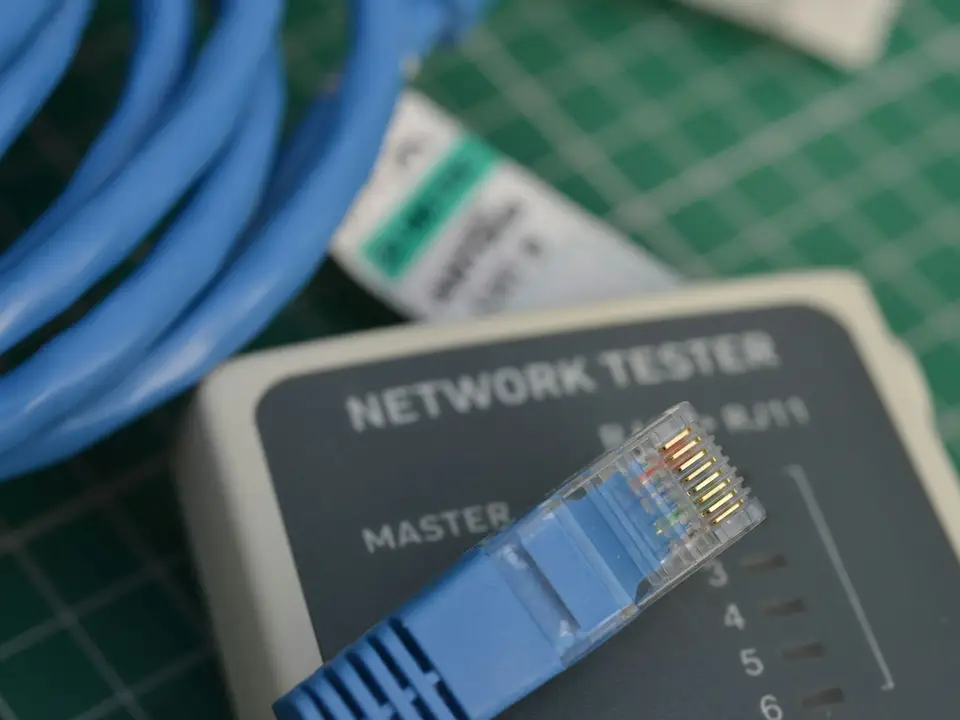
An IP camera has a single RJ45 network connection. Each copper run can be up to 100 metres.
Expected result: One cable, one plug, no separate power supply at the camera.
Small systems can plug cameras straight into PoE ports on the back of the NVR, which keeps them on their own network.
Expected result: No separate switch is needed for a few cameras.
Each analogue HD camera has its own coaxial cable back to the DVR for video, and usually a separate 12 V power feed.
Expected result: You see why every analogue camera needs a home run to the DVR.
Coax cables plug into BNC connectors on the back of the DVR, one per channel. The DVR compresses and records each signal.
Expected result: The number of BNC inputs sets the maximum number of analogue cameras.
IP cameras in a distant building connect to a local PoE switch, linked back to the NVR by fibre. Analogue cameras would each need a long coax run.
Expected result: You see why IP suits spread-out sites.
A hybrid recorder takes existing analogue cameras on coax and new IP cameras over the network at the same time.
Expected result: You can keep working analogue cameras and move to IP gradually.
Put cameras on a separate network or VLAN from staff and guest devices, with unique passwords and current firmware.
Expected result: A compromised laptop or guest phone cannot reach the cameras directly.
Troubleshooting
Common problems and how to fix them
1 IP camera will not add to the old DVR
Likely cause A standard DVR only accepts analogue cameras on its BNC inputs.
Solution Use an NVR or a hybrid recorder with free IP channels.
2 New analogue HD camera shows no picture or a rolling image
Likely cause The DVR does not support that camera's format or resolution, or the camera is set to another format.
Solution Check the DVR's supported formats, switch the camera's output format if it has the option, or update the DVR firmware.
3 Analogue picture is noisy or flickers on long runs
Likely cause Old or poor-quality coax, damaged connectors or interference from mains cables.
Solution Re-terminate the BNC connectors, test the cable and replace damaged runs, keeping them away from mains cables.
4 IP camera far from the switch keeps dropping out
Likely cause Copper run over 100 metres or a weak PoE budget.
Solution Add a switch part-way, use a fibre link, or check the budget with the PoE calculator.
5 Analogue cameras go off in a power cut but the DVR stays on
Likely cause Camera power supplies are not on the UPS.
Solution Put the camera power supplies on the UPS too, or use PoE or PoC so power comes from backed-up equipment.
6 Guests' devices can see the cameras on the network
Likely cause Cameras share a flat network with staff and guest Wi-Fi.
Solution Move the cameras to their own VLAN or the NVR's built-in PoE ports, and change default passwords.
In Depth
In Depth
Ask two installers for a CCTV quotation and one may offer IP cameras while the other offers cheaper "HD" analogue cameras. Both can record a clear picture, but they use different cables, power and recorders, and the cheaper one is not always cheaper over the life of the system.
This comparison explains the two technologies in plain language and when each one makes sense. The tutorial above draws the cabling of each system side by side.
Note Extrion supplies and installs products in this category and earns from sales and installation. No manufacturer paid for or reviewed this comparison.
The two technologies in plain terms
IP cameras are small networked computers. Each camera digitises and compresses its own video and sends it over a network cable to a network video recorder (NVR), usually through a switch. The same cable usually carries power, using Power over Ethernet (PoE). Because they are on a network, IP cameras can sit anywhere the network reaches, including other buildings linked by fibre.
Analogue HD cameras are sold under three main formats: HD-TVI, HD-CVI and AHD. They send a high-definition analogue video signal over coaxial cable to a digital video recorder (DVR), which does the compression. Power usually runs on a separate pair (often in a combined "siamese" cable), although power over coax (PoC) cameras and recorders carry power on the coax itself. Each camera has its own cable back to the DVR.
Analogue HD is not the same as old standard-definition CCTV. Current formats reach up to 4K (8 MP) on some models, and many DVRs accept several formats. Check that the camera format and resolution are listed as supported by the DVR.
Comparison at a glance
IP CCTV
Analogue HD CCTV
Recorder
NVR
DVR (or hybrid recorder)
Cable
Network cable (Cat5e or Cat6); fibre between buildings
Coaxial cable, plus power unless PoC is used
Cable distance
100 m per copper run; extend with switches or fibre
Often longer runs on good coax; the limit depends on format, resolution and cable, so check the datasheet
Power
Usually PoE from the switch or NVR
Separate power supply per camera or group, or PoC
Resolution
Widest range: 2 MP to 8 MP (4K) and beyond, plus panoramic and multi-sensor cameras
Up to about 8 MP (4K) on current models, sometimes at lower frame rates
Smart features
Widest choice: line crossing, intrusion, person and vehicle detection, number-plate recognition
Available on some newer models, more limited overall
Audio and two-way talk
Common on many models
Available on some models
Expansion
Add cameras anywhere the network reaches
Each camera needs its own cable back to the DVR and a free channel
Security
Cameras are network devices that must be updated and kept on their own network
Cameras are not on the network; the DVR is, and needs the same care
The camera price is only part of the total. A fair comparison looks at:
Cameras and recorder: analogue HD is usually cheaper per item.
Cabling and labour: often the largest cost in a new building. For IP, switches placed near groups of cameras can shorten cable runs. For analogue, every camera needs a home run to the DVR, plus power.
Power supplies: IP cameras on PoE share one UPS-backed switch; analogue cameras need separate supplies that each need protecting, unless PoC is used.
Upgrades: IP systems can usually mix newer cameras with existing ones. Changing an analogue system to IP later usually means new cable.
For a new installation, the overall difference is often smaller than the camera prices suggest. For an existing building with good coaxial cable, analogue HD can save the cost and disruption of re-cabling.
Image quality in practice
Resolution matters, but so do the lens, the light and the bitrate. A 4 MP camera with a good sensor and the right lens will often beat a cheaper 8 MP camera at night. When comparing quotations, ask for sample night-time footage, and check that the recorder can record every camera at its full resolution and frame rate. Some DVRs record their top resolution on only some channels. For camera shapes and features, see CCTV cameras explained.
Security considerations
IP cameras are networked devices. Like any device on the network, they need unique passwords, firmware updates and their own network (a separate VLAN or the recorder's built-in PoE ports), separated from staff and guest devices. Vulnerabilities in internet-connected cameras and recorders are well documented by agencies such as CISA. Analogue cameras are not on the network themselves, but the DVR is, and it needs the same care. Whichever you choose, set up remote viewing safely, as described in view CCTV on your phone safely.
When each option makes sense
Choose IP CCTV when
You are installing a new system or re-cabling a building.
You need high resolution, number-plate recognition or smart detection.
Good coaxial cable is already installed and re-cabling would be disruptive.
The site is small, the number of cameras is fixed and the budget is tight.
You are replacing cameras on an existing DVR system that still works well.
The middle ground
Many recorders are hybrid: they accept analogue HD cameras on their BNC inputs and a number of IP cameras over the network. That lets you keep working analogue cameras and add IP cameras in new areas, then move fully to IP when the older cameras reach the end of their life. Check how many IP channels the hybrid recorder supports.
Our honest recommendation
For most new business installations we recommend IP cameras on a dedicated, UPS-backed network. Where an existing analogue system has good cabling and still meets your needs, upgrading the cameras and DVR to analogue HD, or moving to a hybrid recorder, can be the better value. The right answer depends on the building, so a survey is worth doing before deciding. Our guide to choosing a CCTV system for a business walks through the whole decision.
When to call Extrion
If you are comparing quotations or deciding whether to upgrade an existing analogue system, Extrion can survey the cabling and recommend IP, analogue HD or hybrid. See our CCTV installation service, request a quote or contact us.
This guide is general information. Procedures, product features and firmware change, so check your own equipment's documentation before you start.
FAQs
Frequently asked questions
Can I connect IP cameras to my old DVR?
Not to a standard DVR. You need an NVR or a hybrid recorder that accepts IP cameras on its network port.
Is analogue HD the same as old analogue CCTV?
No. HD-TVI, HD-CVI and AHD deliver much sharper pictures than old standard-definition cameras, up to 4K on some models, over similar coaxial cable. They still need a DVR that supports the format.
Can I reuse my old coaxial cable?
Often, if it is in good condition and the right type. Analogue HD cameras can use it directly. For IP cameras you would need Ethernet-over-coax adaptors or new network cable. Test old cable before relying on it.
Do IP cameras need internet?
No. They need a local network to reach the recorder. Internet is only needed for remote viewing and cloud services.
Can analogue cameras be powered through the coax?
Some can. Power over coax (PoC) cameras take power from a PoC-capable DVR or adaptor over the same cable. Standard analogue HD cameras need a separate supply.
Which lasts longer?
Both can run for years if installed well and protected from surges and weather. IP systems are usually easier to extend and upgrade over time.
Need Professional CCTV Installation?
Our engineers survey the site, choose the right cameras and recorder, install them neatly and set up safe remote viewing.
Ask for clarification, tell us a problem this did not solve, or suggest a topic. An engineer reads every message, and we use them to improve the Knowledge Center.
BookBook a consultationPick a time to talk through your project.
Call us+255 674 020223
WhatsAppChat with our team.
Emailinfo@extrion.co.tz
PayPay withBank and mobile money detailsPBZ Bank 045 195 9000Mixx by Yas +255 674 020 223Lipa Namba 16172192
Find usKiembesamaki, Zanzibar
Ask Extrion
Engineers reply Mon – Fri, 08:00 – 17:00
End this chat?
We'll send a copy of the conversation to our team. Next time, the chat starts fresh.
online nowPeople browsing Extrion Tech right now
Privacy by design
A few cookies, only with your say-so
We use essential cookies to keep this website secure and working. With your permission we also remember your preferences and play embedded videos. No advertising trackers, ever. Read our cookie notice
 CCTV, Surveillance & Physical Security
9 min
Comparison