Security & Surveillance

CCTV Cameras Explained: Find the Right One for Your Home or Business

Buying CCTV for the first time is confusing. Sellers use words like turret, NVR, PoE and IP67, and two cameras that look alike can differ a lot in quality.

  • 10 min read
  • Updated
  • Extrion Knowledge Center

Buying CCTV for the first time is confusing. Sellers use words like turret, NVR, PoE and IP67, and two cameras that look alike can differ a lot in quality.

This guide explains, in plain language, what each part of a system does, which camera suits which place, and what to ask before you pay anyone.

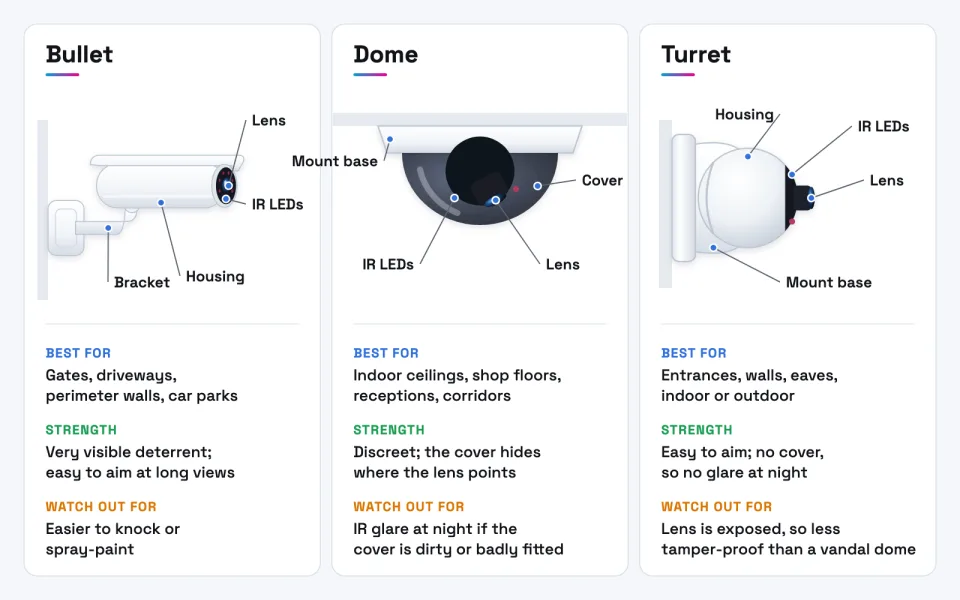
The four camera designs you'll see most often: bullet, dome, turret and PTZ.

What CCTV is and how a system works

CCTV stands for closed-circuit television: cameras that send video to a limited set of screens and recorders, not to public broadcast (Wikipedia: Closed-circuit television).

A typical system has five parts:
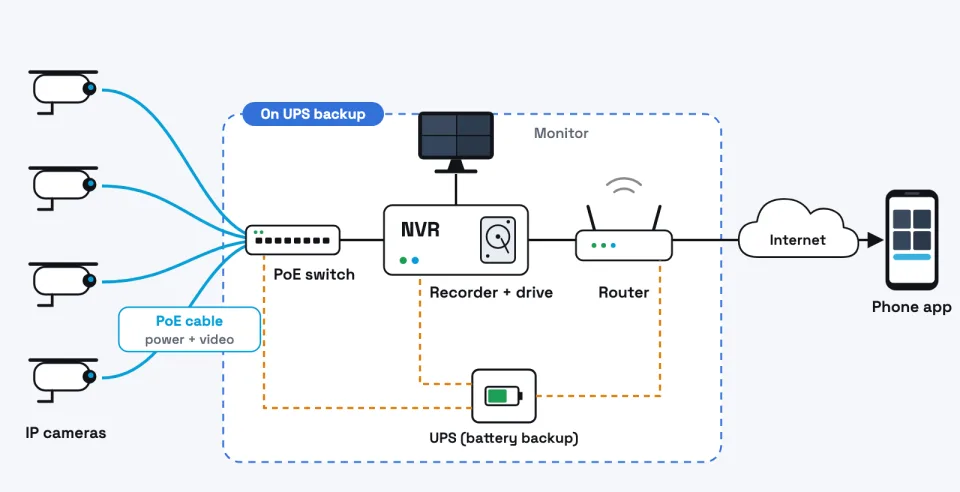
  1. Cameras capture video.
  2. Cables or Wi-Fi carry video (and often power) from each camera.
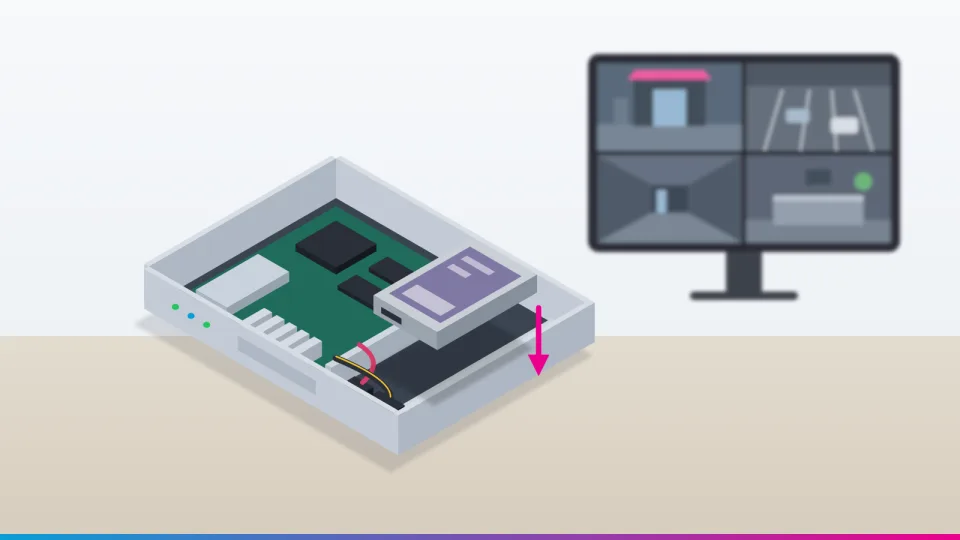
  3. A recorder (an NVR or DVR) saves the video to a hard drive.
  4. A router and internet connection let you watch from elsewhere.
  5. A screen or phone app to watch live video and play back recordings.
A typical IP CCTV system. The switch, recorder and router should stay powered during a power cut.

IP cameras vs analogue (HD-over-coax) cameras

This is the first big choice, because it decides the cables and recorder you need.

  • IP cameras are small network devices. They turn the image into digital data inside the camera and send it over a network cable or Wi-Fi to a Network Video Recorder (NVR) (Wikipedia: IP camera). Many can be powered through the same network cable (PoE, explained below).
  • Analogue HD cameras (often sold as HD-TVI, HD-CVI or AHD) send video over coaxial cable to a Digital Video Recorder (DVR), which does the digital conversion (Wikipedia: Digital video recorder). They usually need a separate power cable.

In short: for new installations, IP is usually the better choice: higher resolutions, smarter features and simpler PoE cabling. Analogue HD can suit a tight-budget upgrade where good coaxial cable already exists.

Plays from YouTube when you press play.

Analog Camera vs. IP Camera: Which Is Right for Your Security System? · watch on YouTube

Camera designs: bullet, dome, turret and PTZ

The shape of a camera (its design or form factor) is separate from the IP/analogue choice. Most designs come in both.

Camera type Typical uses Advantages Limitations
Bullet Gates, driveways, perimeter walls, car parks Very visible deterrent; easy to aim at long views; longer lenses available Easier to knock or spray-paint; birds and insects like to sit on it
Dome Indoor ceilings, shop floors, receptions, corridors Discreet; the cover hides where the lens points; vandal-resistant versions are common Dome cover can cause IR glare at night if dirty or badly fitted; harder to re-aim
Turret ("eyeball") Entrances, walls, eaves, general indoor/outdoor use Easy to aim; no dome cover, so no cover glare at night; compact Lens is exposed, so less protected from tampering than a vandal dome
PTZ (pan-tilt-zoom) Large yards, hotel grounds, warehouses, school compounds One camera can be moved and zoomed to follow activity Costly; when it looks one way, it misses the other; needs more power and a good operator or presets
Bullet, dome and turret cameras compared. The design affects visibility, aiming and night-time glare.

Tip Most properties use a mix: bullets or turrets outside, domes inside, and a PTZ only where someone actually watches live. For a deeper comparison, see Bullet vs Dome Cameras: Which Is Right for Your Property?.

Plays from YouTube when you press play.

Security Camera Types Explained: How Do I Choose Security Camera? Complete Guide For All · watch on YouTube

Indoor vs outdoor cameras: IP and IK ratings

Outdoor cameras face sun, rain, dust and sometimes a thrown stone. Two ratings tell you how well a camera copes.

  • IP (Ingress Protection) rating, defined in IEC 60529. The first digit is dust, the second is water. "6" for dust means dust-tight. A second digit of 6 means it survives powerful water jets; 7 means temporary immersion (up to 1 m for 30 minutes). An IP67 device is not automatically jet-proof, which is why some cameras are rated "IP66/IP67" (Wikipedia: IP code). For outdoor use, look for at least IP66 on the datasheet.
  • IK rating, defined in IEC 62262, measures resistance to impacts. IK08 means 5 joules; IK10 means 20 joules (Wikipedia: EN 62262). Choose IK10 where people can reach the camera.

Warning Ratings apply to the camera only. A badly sealed cable joint or junction box can still let water in. Ask how connections will be protected.

Plays from YouTube when you press play.

IP Ratings Explained: What to Look For in a Weatherproof Security Camera · watch on YouTube

Image quality: resolution, lens, night vision and WDR

Resolution is measured in megapixels (MP). 2 MP (1080p) is the entry level; 4 MP is a common sweet spot; 8 MP (4K) gives more detail but needs more storage and bandwidth.

Field of view and lens matter as much as resolution. A wide lens (2.8 mm) covers a whole room but shows faces small; a narrower lens (6 mm or more) sees further but less wide. Varifocal lenses can be adjusted during installation.

Night vision comes in two main types:

  • Infrared (IR): invisible light gives a black-and-white image in darkness. The range on the datasheet is under ideal conditions.
  • Full-colour night cameras: use very sensitive sensors and/or a small white light to show colour at night, which helps identify clothes and vehicles. The light can disturb neighbours or guests.

WDR (Wide Dynamic Range) helps when a scene has bright and dark areas at once, such as a doorway with bright sun behind people. Without it, faces can become dark silhouettes (Axis: Forensic WDR). Look for "true WDR" with a dB figure on the datasheet for entrances.

Wired vs wireless cameras

  • Wired PoE (Power over Ethernet): one network cable carries both power and video. Standard PoE (802.3af) delivers up to 12.95 W at the camera and PoE+ (802.3at) up to 25.5 W (Wikipedia: Power over Ethernet). A single Ethernet run is limited to 100 metres (Wikipedia: Ethernet over twisted pair). This is the most reliable option for most businesses. Use the PoE budget calculator to check a switch can power all cameras.
  • Wi-Fi cameras: easier to install, but each still needs power, and thick block walls, distance and busy networks cause dropped video.
  • Battery cameras: no cables, but they usually record only short motion clips and need recharging. Fine for a small home or temporary spot, not for continuous business recording.

Recorders, hard drives, network and apps

  • NVR or DVR: stores the video and manages cameras. Match the recorder to the camera type (IP → NVR, analogue → DVR) and allow spare channels for future cameras.
  • Surveillance hard drives: recorders write video around the clock. Drives built for this, such as Seagate SkyHawk, are specified for surveillance workloads (Seagate). Ordinary desktop drives are not a good substitute.
  • Network equipment: a PoE switch, good cabling and a router. Larger sites may separate cameras from staff and guest Wi-Fi. Extrion's network and Wi-Fi service covers this.
  • Mobile app: live view and playback on your phone.

How much storage you need depends on camera count, resolution, compression and how many days you keep. Try the CCTV Storage & Bandwidth Calculator and read How Much CCTV Storage Do You Really Need?. For setting up phone viewing securely, see How to View Your CCTV Cameras on Your Phone Safely.

Plays from YouTube when you press play.

How an IP CCTV Camera system works using POE switch & NVR · watch on YouTube

Choosing a system for your property

Property What usually matters Typical starting point
Home Gate, doors, parking, simple app 2–4 IP turrets or bullets outdoors, small NVR
Shop Till, entrance faces, stock areas Domes over till and aisles; WDR camera at the door
Office Reception, server room, entrances Domes indoors; turrets at doors; access control can complement CCTV
Hotel / guesthouse Gates, parking, lobby, corridors, beach or pool access Mix of turrets, domes and possibly a PTZ for grounds; strict privacy zones
School Gates, corridors, play areas Vandal-resistant (IK10) domes; clear policy on who views footage
Warehouse Loading bays, perimeter, high racking Bullets with longer lenses outside; high-mounted cameras inside; PTZ for yards

These are starting points; a site survey decides the final design.
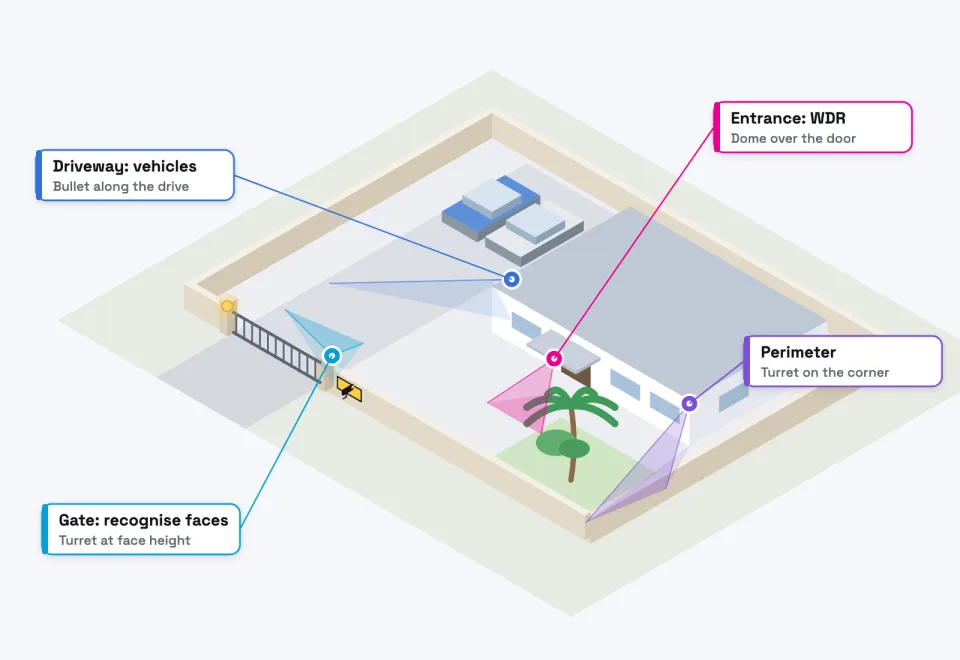
Example camera positions: cover entry points first, then routes and valuable areas.

Installation and purchasing considerations

  • Power cuts: a CCTV system that switches off during a power cut misses the moments that matter. Put the recorder, PoE switch and router on a UPS (battery backup) and ask how long it will last.
  • Coastal salt air: near the sea, salt corrodes cheap brackets, screws and connectors. Ask for stainless-steel fixings and sealed junction boxes, and check the datasheet's environmental rating.
  • Cable routes: run cables in conduit or trunking, out of reach and not alongside mains power for long distances.
  • Lighting: add outdoor lighting where faces must be identified at night.
  • Privacy and signage: Tanzania's Personal Data Protection Act, 2022 came into force on 1 May 2023, and businesses that collect personal data must register with the Personal Data Protection Commission (DLA Piper). In 2024 the Commission warned that cameras in private places such as toilets are prohibited (Techtrends KE). Good practice, as in the UK regulator's CCTV checklist, includes visible signs, limiting who can view footage and avoiding views of neighbours' property. Seek legal advice for your situation.

Common mistakes

  1. Buying on megapixels alone and ignoring lens, WDR and night performance.
  2. Mounting cameras too high or too wide to recognise faces.
  3. Pointing a camera straight at the sun or a bright doorway.
  4. Using a desktop hard drive or too little storage.
  5. No UPS, so the system goes dark in a power cut.
  6. Keeping the default password, or opening the recorder to the internet with port forwarding.
  7. Cheap brackets that rust within months near the coast.
  8. Nobody responsible for checking the system works.

Camera-selection checklist

  • I know what each camera must do: detect movement, recognise a person, or read a number plate.
  • Outdoor cameras are at least IP66, and reachable ones IK10.
  • The lens suits the distance and width of each view.
  • Entrances have a camera with true WDR.
  • Night vision type (IR or full colour) suits each location.
  • Camera and recorder type match (IP + NVR, or analogue + DVR).
  • Storage is calculated for the number of days I need.
  • The recorder, switch and router are on a UPS.
  • Privacy zones, signage and access to footage are agreed.

Questions to ask an installer before buying

  1. Will you survey the site before quoting?
  2. What camera brand and model, and can I see the datasheets?
  3. How many days of recording will I get, and at what quality?
  4. How will cameras and the recorder be powered during a power cut?
  5. How will cables be run and protected?
  6. How will remote viewing be set up securely, without port forwarding?
  7. Who owns the admin password, and will you hand it over?
  8. What training, warranty and after-sales support are included?

Frequently asked questions

Is an IP camera always better than an analogue one?

Not always. IP is usually better for new installations, but analogue HD can be a sensible budget upgrade where good coaxial cable is already installed.

Can I use Wi-Fi cameras for my business?

For one or two cameras close to the router, perhaps. For continuous, reliable recording across a business, wired PoE cameras are usually the safer choice.

Will my cameras work during a power cut?

Only if the cameras, recorder, switch and router are on a UPS or backup power. Without it, recording stops when the power goes off.

Do I need to put up CCTV signs?

Signage is widely recommended good practice, and Tanzania's data protection law applies to organisations that collect personal data. Check your obligations with the Personal Data Protection Commission or a legal adviser.

How long should I keep recordings?

Long enough to notice and investigate an incident, often one week to one month. The storage calculator shows what that means in disk space.

Next steps

Start by listing what you want to protect and what each camera must see. Then use the CCTV storage calculator to understand recording needs and read the related guides above.

When you're ready, Extrion's security team can survey your site and recommend a system. You can also list what you need in the Smart Quote builder and request a custom quotation.

This guide is general information to help you plan. Prices, product features and regulations change, so confirm the details for your own site before you buy.

WhatsApp

Let’s start with you Who should our team speak to about this service?
How should we reach you?