"How many days will it record?" is one of the most common questions about any CCTV system, and the answer is usually "it depends". This guide shows what it depends on, gives you a simple formula you can work out on your phone's calculator, and explains why the real number is usually a little lowe...
10 min read
Updated
Extrion Knowledge Center
"How many days will it record?" is one of the most common questions about any CCTV system, and the answer is usually "it depends". This guide shows what it depends on, gives you a simple formula you can work out on your phone's calculator, and explains why the real number is usually a little lower than the estimate.
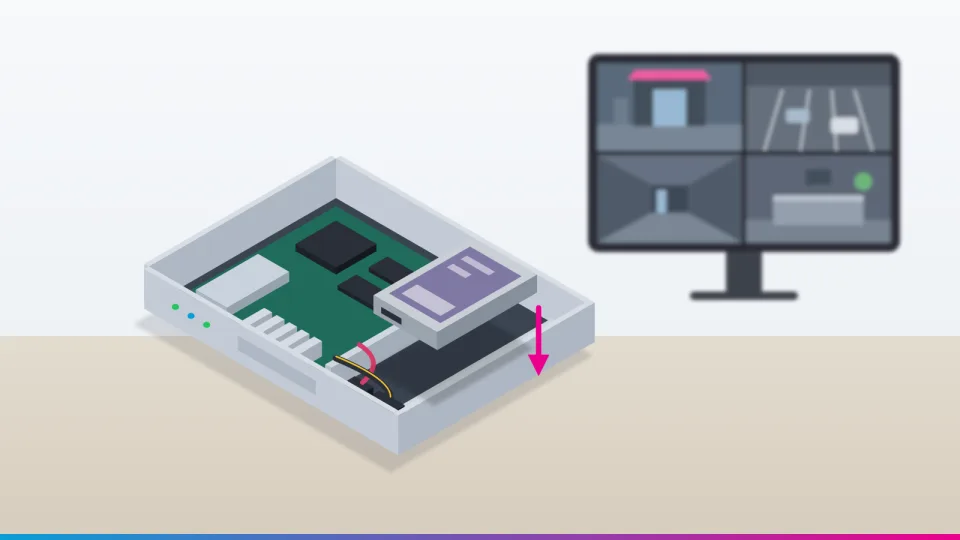
The recorder's hard drive holds a rolling window of recent footage. Its size and the cameras' bitrate decide how many days you keep.
How CCTV recording storage works
Each camera sends a continuous stream of compressed video to a recorder. That is an NVR (network video recorder) for IP cameras or a DVR for analogue cameras. The recorder writes the stream onto one or more hard drives.
When the drive is full, most recorders overwrite the oldest footage first. So the drive holds a rolling window of the most recent X days, and X is what you are really choosing when you choose a drive.
Two numbers decide X:
How much data the cameras produce, measured as bitrate.
How much space you can actually use on the drives.
Resolution vs bitrate
Resolution is how many pixels each picture has (2 MP is roughly 1080p; 8 MP is roughly 4K). Bitrate is how much data the camera sends every second, usually shown in kbps (kilobits per second) or Mbps (megabits per second; 1 Mbps = 1,000 kbps).
Storage depends on bitrate, not resolution. Higher-resolution cameras are usually set to higher bitrates, but two 4 MP cameras can produce very different amounts of data. The difference comes from their codec, frame rate, quality setting and what they are looking at.
Tip You can see the bitrate in the camera's or recorder's video/encoding settings. That figure is the best starting point for any calculation, and it is better than a typical value from the internet.
Number of cameras: storage grows in direct proportion. Twice the cameras at the same bitrate need twice the space.
Bitrate per camera: this is the biggest lever. A camera at 4 Mbps uses twice the space of one at 2 Mbps.
Frame rate: more frames per second (fps) usually means a higher bitrate. Many business systems record at 10–15 fps rather than 25–30 fps. That still shows what happened and uses less space.
Recording mode and hours: recording 12 hours a day uses roughly half the space of recording 24 hours.
Continuous vs motion (event) recording
Continuous recording saves everything. It uses the most space, but you never miss the moments around an incident.
Motion or event recording saves only when the camera or recorder detects movement or another event, plus a few seconds before and after. It can greatly extend retention for quiet areas such as a store room at night. It is less predictable, though:
A busy shop floor or hotel lobby may have movement most of the day, so the saving is small.
Trees, headlights, rain, insects near infrared lights and changing shadows can all trigger false recordings.
If detection misses something, it is not recorded at all.
A sensible approach for many businesses is continuous recording on key cameras (entrances, tills, reception) and event recording on low-traffic areas.
Compression: H.264, H.265 and "smart" codecs
Raw video is enormous, so cameras compress it with a codec. The two you will see most are H.264 and the newer H.265 (also called HEVC). Both are international standards; H.265 is published by the ITU as Recommendation H.265. H.265 generally reaches similar picture quality at a lower bitrate. Extrion's own calculator assumes H.265 needs about half the bitrate of H.264 as a starting estimate, but the real saving depends on the camera and the scene.
Many manufacturers add their own "smart" settings on top. These usually compress an unchanging background more heavily and spend more data on moving objects. For example, Axis says its Zipstream technology cuts bandwidth and storage by 50% or more. Other brands have similar features under their own names. Treat these figures as vendor claims under favourable conditions. Savings are largest on quiet, static scenes and smallest on busy ones. Before relying on one, check that the camera and recorder both support it.
The formula, step by step
All you need is the total bitrate of all your cameras in Mbps.
Step 1: data per second. 1 Mbps = 1,000,000 bits per second. There are 8 bits in a byte, so that is 125,000 bytes per second.
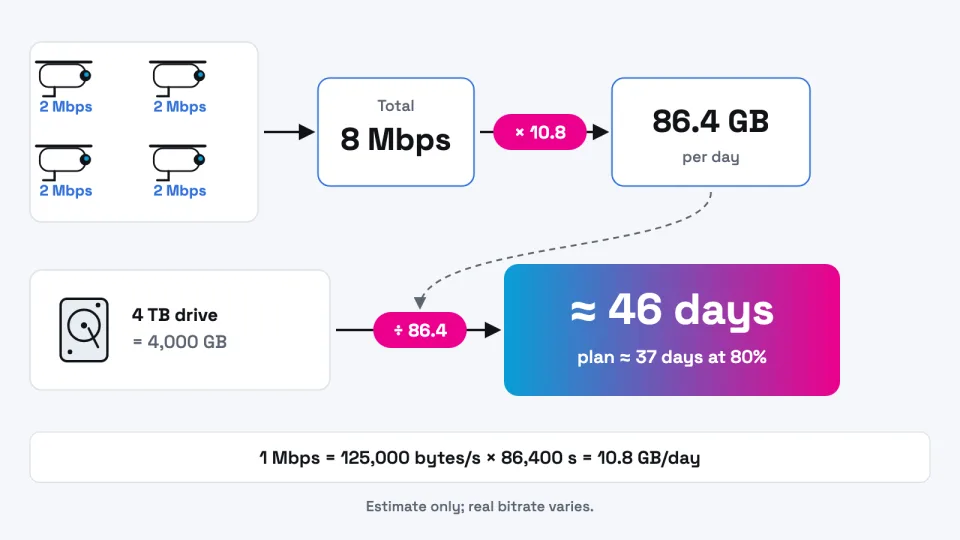
Step 2: data per day. A day has 86,400 seconds. 125,000 × 86,400 = 10,800,000,000 bytes, or 10.8 GB per day for every 1 Mbps recorded continuously.
So, as a simplified estimate:
GB per day ≈ total Mbps × 10.8 (continuous recording)
Step 3: storage for your retention period. Divide by 1,000 to get terabytes. Then scale for the hours you record and the number of days you want:
TB ≈ total Mbps × 0.0108 × (hours per day ÷ 24) × days
To go the other way and find how many days a drive will hold:
Days ≈ usable storage in GB ÷ GB per day
These are planning estimates, not guarantees. They use decimal units (1 TB = 1,000 GB), as drive labels do.
Worked example 1: how big a drive? Eight cameras at 4 Mbps each, recording 24 hours a day, kept for 30 days.
Total bitrate: 8 × 4 = 32 Mbps
Per day: 32 × 10.8 = 345.6 GB
30 days: 32 × 0.0108 × 1 × 30 = 10.37 TB
Add 20% headroom: about 12.4 TB, for example two 8 TB drives
Worked example 2: how many days will my drive hold? Four cameras at 2 Mbps each on a 4 TB drive, recording continuously.
Total bitrate: 8 Mbps, so 8 × 10.8 = 86.4 GB per day
4,000 GB ÷ 86.4 = about 46 days in theory
Allowing 20% for overheads and variation: about 37 days
Worked example 3: part-day recording. Four cameras at 4 Mbps, recording 12 hours a day for 14 days: 16 × 0.0108 × (12 ÷ 24) × 14 = about 1.21 TB.
The whole calculation in one line: total Mbps × 10.8 gives GB per day; divide usable storage by that to get days.
How 1, 2, 4, 6, 8 TB and larger compare
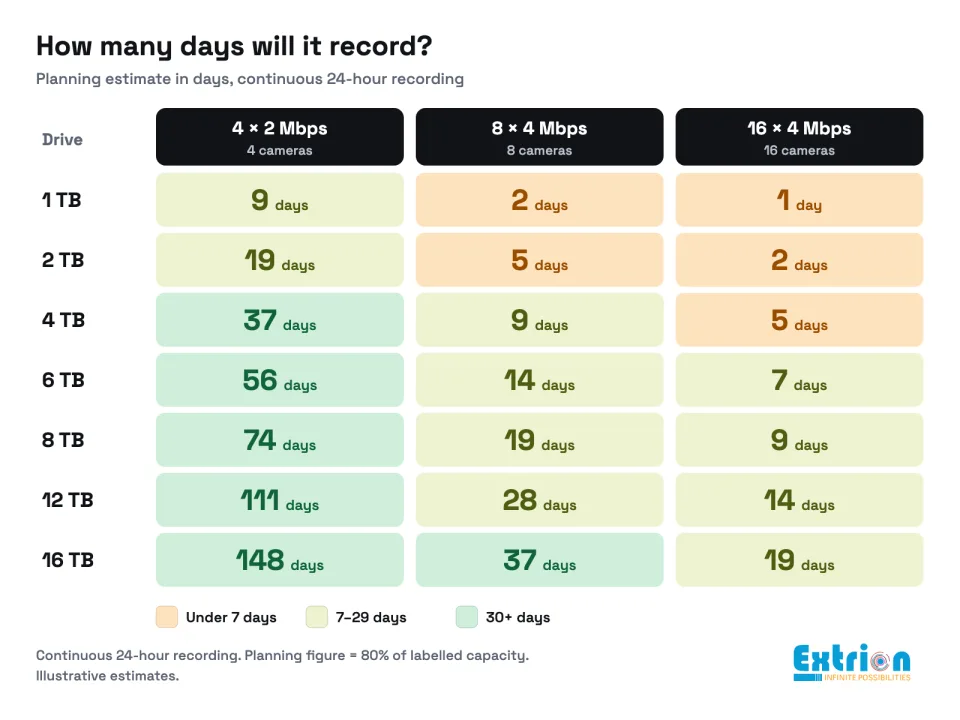
The table shows estimated days of continuous, 24-hour recording. The first figure uses the full labelled capacity. The figure in brackets is the planning figure: 80% of capacity, to allow for overheads, bitrate swings and spare space.
Drive capacity
4 cameras × 2 Mbps (8 Mbps, 86.4 GB/day)
8 cameras × 4 Mbps (32 Mbps, 345.6 GB/day)
16 cameras × 4 Mbps (64 Mbps, 691.2 GB/day)
1 TB
11.6 (9.3) days
2.9 (2.3) days
1.4 (1.2) days
2 TB
23.1 (18.5) days
5.8 (4.6) days
2.9 (2.3) days
4 TB
46.3 (37.0) days
11.6 (9.3) days
5.8 (4.6) days
6 TB
69.4 (55.6) days
17.4 (13.9) days
8.7 (6.9) days
8 TB
92.6 (74.1) days
23.1 (18.5) days
11.6 (9.3) days
12 TB
138.9 (111.1) days
34.7 (27.8) days
17.4 (13.9) days
16 TB
185.2 (148.1) days
46.3 (37.0) days
23.1 (18.5) days
Illustrative estimates from the formula above. Your real bitrates will differ.
Double the drive and you double the days. Double the total bitrate and you halve them. Recorders with several drive bays let you add capacity later rather than replace it.
Why real retention differs from the estimate
Variable bitrate (VBR). Many cameras use VBR. They send less data when the scene is still and more when it is busy, up to a maximum you set. Constant bitrate (CBR) is easier to predict, but it can waste space on quiet scenes and lose quality on busy ones. With VBR, plan using the average bitrate the recorder reports over a few full days, not the maximum or a quiet-hour reading.
Scene complexity. A busy market street, moving leaves or a reception full of people produce more data than an empty corridor.
Night-time noise. In low light, cameras boost the image signal or switch to infrared. That adds grainy "noise", which the codec tries to record as detail. As a result, night footage often uses more data than day footage.
Overwrite settings. If overwrite is switched off, many recorders stop recording when the drive is full. Check that it is set the way you intend.
TB vs TiB. Drive makers use decimal units: Western Digital's capacity note defines one terabyte as one trillion bytes. Many recorders and computers count in binary units, where 1 TiB is 1,099,511,627,776 bytes (NIST explains the difference). So an 8 TB drive may appear as about 7.28 "TB". No space is missing; it is just a different unit.
Formatting and system space. The file system and indexes take a small slice of the drive.
RAID. Recorders with several drives can protect footage with RAID, which uses some capacity for redundancy. RAID 1 (mirroring) keeps half the total. RAID 5 loses one drive's worth and RAID 6 loses two. For example, four 4 TB drives in RAID 5 give about 12 TB before formatting.
Warning If footage is copied to cloud storage or an off-site recorder, the internet connection must carry the full bitrate continuously. Eight cameras at 2 Mbps need about 16 Mbps of steady upload speed, which many business connections cannot sustain.
Usable storage and spare capacity
Plan on using about 80% of the labelled capacity. Extrion's calculator applies the same idea in reverse by adding 20% headroom. The margin absorbs busy days, noisy nights, formatting overhead and a camera or two added later.
Use surveillance-class hard drives where possible. Manufacturers design them for continuous writing from many camera streams. Check the drive's datasheet for its workload rating and supported number of streams, and confirm it is on your recorder's compatibility list.
Protect the recorder with a UPS (battery backup). Repeated power cuts can interrupt recording and are hard on drives that write all day.
Common mistakes
Sizing the drive from resolution alone and ignoring the actual bitrate setting.
Assuming motion recording will save 80% on cameras that face busy areas.
Comparing an "8 TB" label with a "7.28 TB" screen reading and thinking the drive is faulty.
Forgetting that adding cameras later shortens retention for every camera.
Using a desktop hard drive in a recorder that writes 24 hours a day.
Turning on "smart" codecs without checking that the recorder and viewing apps support them.
How to choose a retention target
Start from a business question: how long might it take before you know you need the footage?
Shops: shrinkage is often found at a weekly or monthly stock-take, so 30 days is a common starting point.
Hotels and guest houses: guests may report a problem after they have checked out and gone home. Around 30 days is a common choice.
Offices: incidents are usually noticed within days. Many offices choose 14–30 days.
Homes: 7–14 days is often enough to cover a holiday away.
These are common practices, not legal requirements. We could not find a single fixed retention period for CCTV in Tanzania. Tanzania's Personal Data Protection Act, 2022 (Act No. 11 of 2022) requires personal data to be kept no longer than necessary for its purpose. Recognisable CCTV images of people can count as personal data. The Act's application in Zanzibar is limited to Union matters. Check the position for your organisation with the Personal Data Protection Commission or a lawyer. Your insurer, bank or licensing authority may also set requirements.
For comparison, the UK regulator says its law sets no minimum or maximum retention period, and warns against keeping footage longer just because storage allows it.
Tip When something happens, export the relevant clip straight away. Do not rely on it still being on the drive next month.
Planning estimates for continuous recording. Your cameras' real bitrate will change these numbers.
It depends on the total bitrate. Four cameras at 2 Mbps each would fill 2 TB in about 23 days of continuous recording; plan for about 18. Eight cameras at 4 Mbps would fill it in under 6 days.
Does H.265 really halve storage?
Often it saves a lot, but not always exactly half. The saving depends on the camera, settings and scene. Use it as a starting estimate, then check the real bitrate on your recorder.
Is motion recording enough?
For quiet areas, often yes. For entrances, tills and reception, continuous recording is safer, because detection can miss events and you lose the moments before them.
Why does my recorder show less space than the drive label?
Mostly because it counts in binary units (TiB) while the label uses decimal (TB). Formatting takes a little more. An 8 TB drive showing about 7.28 is normal.
Can I add more storage later?
If the recorder has a free drive bay, yes. If not, you may need to replace the drive (and lose the old footage on it) or upgrade the recorder. Ask about spare bays when you buy.
Next steps
Find each camera's bitrate in the recorder's settings and add them up.
If you would like help sizing storage for a new or existing system, Extrion's security and surveillance team can review your cameras and retention needs. You can also list what you have in the Smart Quotation Builder for a tailored quotation.
This guide is general information to help you plan. Prices, product features and regulations change, so confirm the details for your own site before you buy.
We use essential cookies to keep this website secure and working. With your permission we also remember your preferences and play embedded videos. No advertising trackers, ever. Read our cookie notice

 Security & Surveillance
10 min
Security & Surveillance
10 min